AS26 Guest Lecture

Ground Station Software &
Object-Oriented Programming

Bridging the gap between Web Scripting and Mission-Critical Systems in Space Engineering.
Dr. Anwar Sounny
Guest Lecturer Dr. Anwar Sounny
Dr. Ramson Nyamukondiwa
Course Lead Dr. Ramson Nyamukondiwa
1. Introduction & Framing

Video Lecture: Ground Station Fundamentals

Watch this pre-recorded lecture for an overview of the concepts we will cover today.

1. Introduction & Framing

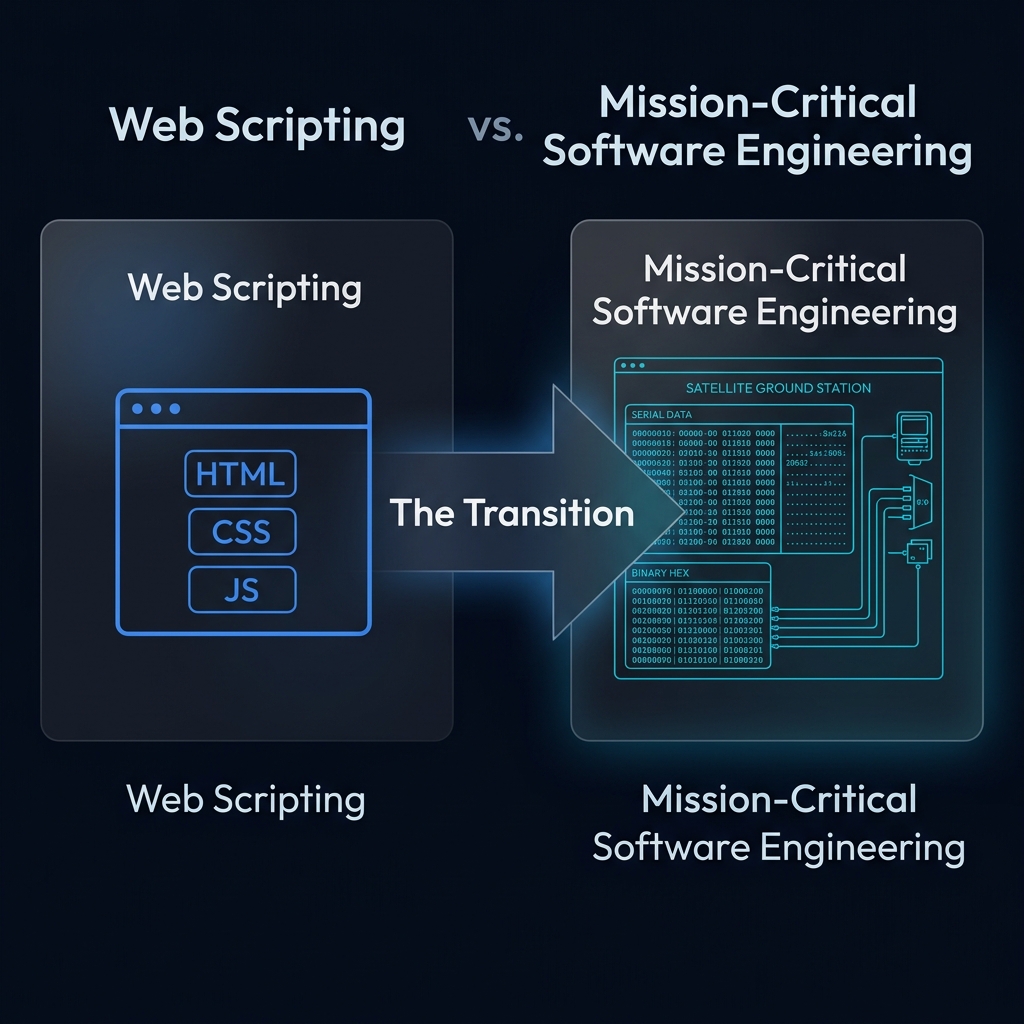
Scripting vs Software Engineering

In the Space Apps bootcamp, you learned web scripting (HTML, CSS, JavaScript, Leaflet maps, and Firebase databases) to create interactive visual interfaces. Developing ground station middleware introduces structural shifts:

Aspect Web Scripting Mission Software
Goal UX and reactive interfaces. Reliability and data parsing.
Failure Reload the page. Loss of Mission.
Data Strings, JSON. Raw bytes, binary frames.
Hardware Browser sandbox, APIs. Serial ports, radio links.
Web Scripting vs Mission-Critical Software Engineering Comparison Diagram
1. Introduction & Framing

Why Mission-Critical Systems Need Structure

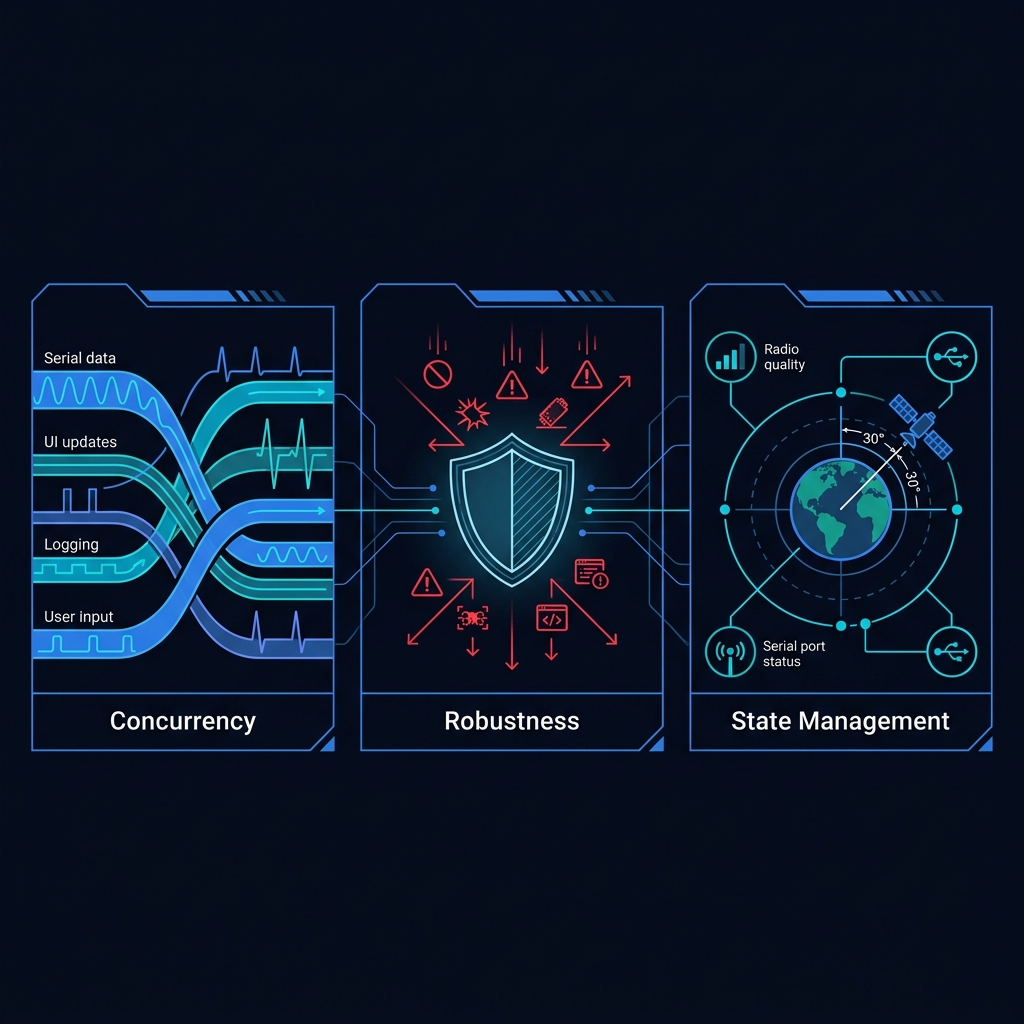
As you transition into building a satellite ground station, ad hoc scripting files quickly become unmanageable. Ground station software must handle multiple concurrent tasks:

  • Concurrency: Reading serial data streams from a radio transceiver while simultaneously updating real-time tracking graphs, logging entries to a local server, and waiting for user command inputs.
  • Determinism & Robustness: A ground station cannot afford unexpected crashes, memory leaks, or unhandled exceptions when tracking a satellite overhead.
  • State Consistency: Your software needs to track the precise status of the satellite pass, including ground track coordinates, active serial port, radio link quality, and tracking angles.
πŸ’‘
Core Pedagogical Pivot: To scale from simple visual scripts to mission-critical applications, developers use Object-Oriented Programming (OOP). OOP structures code around real-world objects rather than pure sequential commands.
Mission-critical systems require concurrency, robustness, and state management
1. Introduction & Framing

Systems Thinking: The Software Architect Mindset

In professional aerospace and mission software engineering, individual code lines are rarely written from scratch. The true engineering innovation lies in the organization of code and the orchestration of workflows.

πŸ› οΈ
The Systems Architect: As a systems engineer, you are not just writing scripts; you are building an integrated cyber-physical machine. You must understand how components connect and trace data flows through every layer of the mission.
  • Component Orchestration: Linking physical sensors, ESP32 microcontrollers, XBee radio transceivers, local Flask servers, and interactive web dashboards.
  • Workflow Design: Composing data telemetry (downlink) and control instructions (uplink) into a secure, predictable loop.
  • Systems Level Debugging: Troubleshooting an error by tracing it through hardware buffers, radio signals, serial parses, database saves, and browser rendering.
Systems engineering links physical sensors to local middleware and reactive web dashboards
1. Introduction & Framing

Data Types: JavaScript vs C/C++

In JavaScript, you never think about data types. A variable is just var x = 5 or let name = "ISU". In C/C++ and C#, every variable must declare its exact type and size because the compiler needs to know how many bytes to allocate in memory.

JavaScript (Loose Typing)
var temperature = 25.46;   // number
var sensorName = "BME280"; // string
var isActive = true;       // boolean
var count = 42;            // number

// JS doesn't care if 42 is an
// integer or float. It's all
// just "number" (64-bit float).
C/C++ (Strict Typing)
float    temperature = 25.46f;  // 4 bytes
char     sensorName[] = "BME280"; // 7 bytes
bool     isActive = true;       // 1 byte
int      count = 42;            // 4 bytes
uint8_t  rawByte = 0xFF;        // 1 byte
double   precise = 3.14159265;  // 8 bytes

// Every byte matters in telemetry.
C/C++ Type Size Range / Purpose Ground Station Example
uint8_t / byte 1 byte 0 to 255 Frame header byte: 0xA1
int 4 bytes -2.1B to 2.1B Sensor ID: 0x00000002
float 4 bytes ~7 decimal digits Temperature: 25.46
double 8 bytes ~15 decimal digits GPS coordinates: 48.5734053
char 1 byte Single ASCII character Command flag: 'T'
1. Introduction & Framing

Anatomy of a C Program

A C/C++ program has a rigid structure that differs significantly from a JavaScript file. Understanding this structure is essential before reading the ESP32 satellite firmware.

JavaScript File
// Just start writing code!
let temp = 25.46;
console.log("Temperature:", temp);

// Functions anywhere
function readSensor() {
  return Math.random() * 40;
}

// No compilation needed
// Browser runs it directly
C/C++ Program (Arduino/ESP32)
// 1. INCLUDES (import libraries)
#include <Wire.h>
#include "sensors.h"

// 2. GLOBAL VARIABLES (typed!)
float temperature = 0.0;
int   sensorID   = 0x02;

// 3. SETUP (runs once at boot)
void setup() {
  Serial.begin(115200);
  Wire.begin(13, 15);
}

// 4. LOOP (runs forever)
void loop() {
  temperature = readBME();
  Serial.write((uint8_t*)&temperature,
    sizeof(float));
  delay(1000);
}
#include
Like JS import. Pulls in library code at compile time.
setup()
Runs once when the microcontroller boots. Initialize pins, sensors, serial.
loop()
Runs forever, like setInterval. The main execution cycle.
void
Return type meaning "returns nothing." Functions must declare what they return.
1. Introduction & Framing

C Syntax Essentials: The Rules of the Compiler

Because C++ is compiled and strictly typed, the syntax is highly structured. Code blocks, terminations, and comments have rigid rules that the compiler enforces strictly before any code runs.

Syntax Element C/C++ Rule Ground Station Example
Commenting Code Single-line uses //.
Multi-line blocks use /* ... */.
// Reads temperature sensor
/* Configure hardware pins */
Semicolons Required to terminate every single instruction statement. float temp = 25.4f; (Compiler fails if missing)
Curly Braces {} Enclose bodies of functions, loops, and conditional statements. void loop() { readSensor(); }
Case Sensitivity Identifiers are case-sensitive (capitalization matters!). sensorTemp and sensortemp are completely different.
🚨 Pass-by-Reference (The & Operator)

In JavaScript, numbers and booleans are passed by value. In C/C++, you can pass a variable's memory reference using &. This allows a function to modify variables directly in the calling function!

// Function signature in sensors.h
bool readBME(float &temp, float &pres);

// Calling the function in loop()
float t, p;
bool success = readBME(t, p); 
// 't' and 'p' are updated directly in memory!
1. Introduction & Framing

What is Object-Oriented Programming?

OOP organizes software around data (attributes) and behavior (methods) rather than sequential scripts. We model physical hardware as distinct, logical entities.
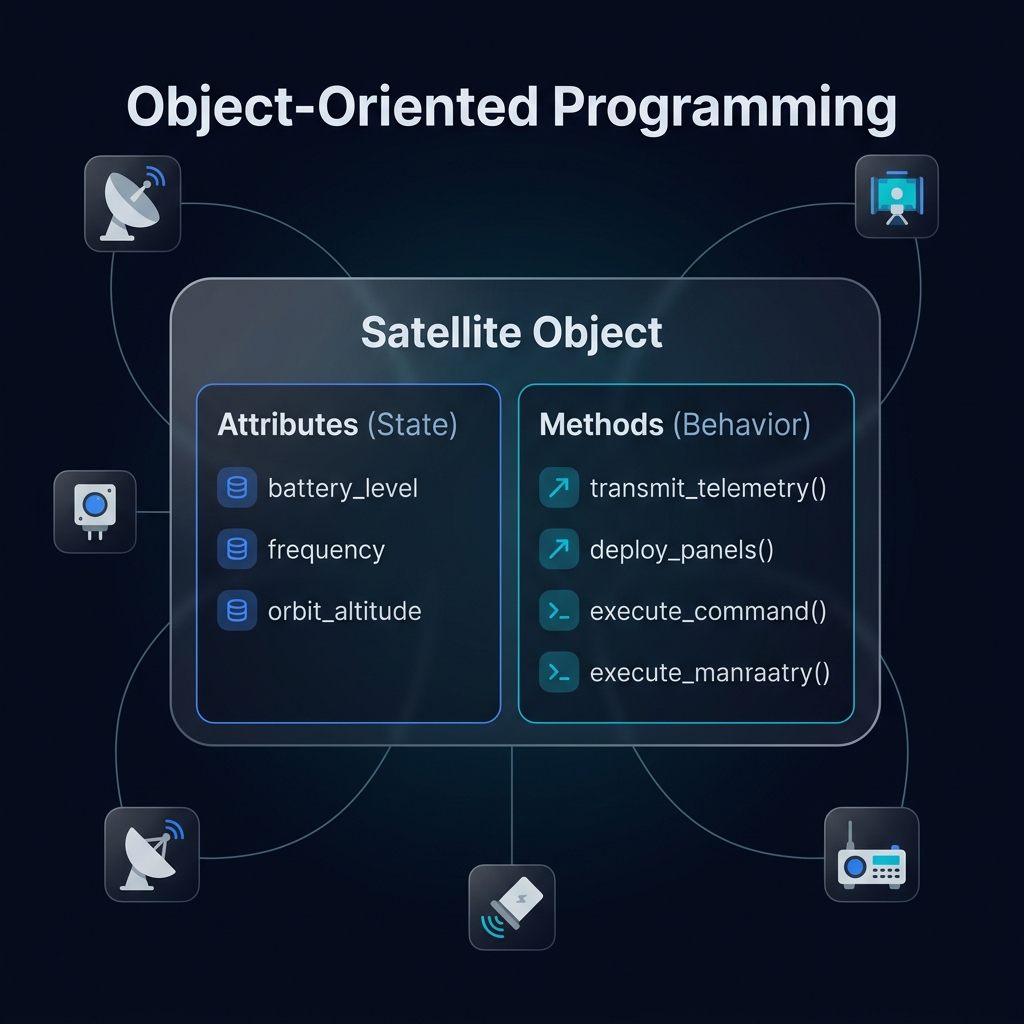
Attributes (State / Data)
Variables that store information about an object. Each object has its own copy.

// Satellite attributes
string  name         = "ISU-SAT1";
float   batteryLevel = 87.3;
double  frequency    = 437.500;
int     orbitAltKm   = 550;
bool    isTransmitting = true;
uint8_t satelliteID  = 0x13;
Methods (Behavior / Actions)
Functions that define what an object can do. They operate on the object's own attributes.

// Satellite methods
void  transmitTelemetry();
void  takePicture();
void  setRefreshInterval(int ms);
float getBatteryLevel();
bool  executeCommand(uint8_t cmd);
void  deploySolarPanels();
Object-Oriented Programming concepts diagram
2. OOP & Space Analogies

Class vs Object: A Classic Example

The most common confusion for beginners: what is the difference between a Class and an Object? Think of it like this:

Class = The Blueprint
class Car {
  // Attributes (no values yet)
  string make;
  string color;
  int    horsepower;
  float  fuel_level;

  // Methods (what it can do)
  start_engine();
  accelerate(speed);
  refuel(liters);
}
Objects = Real Instances
// Two objects from the same class

myCar = new Car()
  myCar.make       = "Toyota"
  myCar.color      = "Red"
  myCar.horsepower = 150
  myCar.fuel_level = 45.2

yourCar = new Car()
  yourCar.make       = "BMW"
  yourCar.color      = "Black"
  yourCar.horsepower = 300
  yourCar.fuel_level = 60.0
Key Idea:
One class, many objects. Each object has its own independent copy of the data. Changing myCar.fuel_level does not affect yourCar.fuel_level.
2. OOP & Space Analogies

Now Apply It: The Satellite Analogy

The same pattern applies directly to ground station development:

  • Class (The Blueprint): Defines what attributes and methods all satellites share. No hardware or specific orbit exists yet.
  • Object (The Instance): A specific satellite built from the blueprint, orbiting in its own track, with independent battery and telemetry values.
Example:
If Satellite is the class, then ESTubeSat-1 and ESTubeSat-2 are two distinct objects, each running separate telemetry at different frequencies.
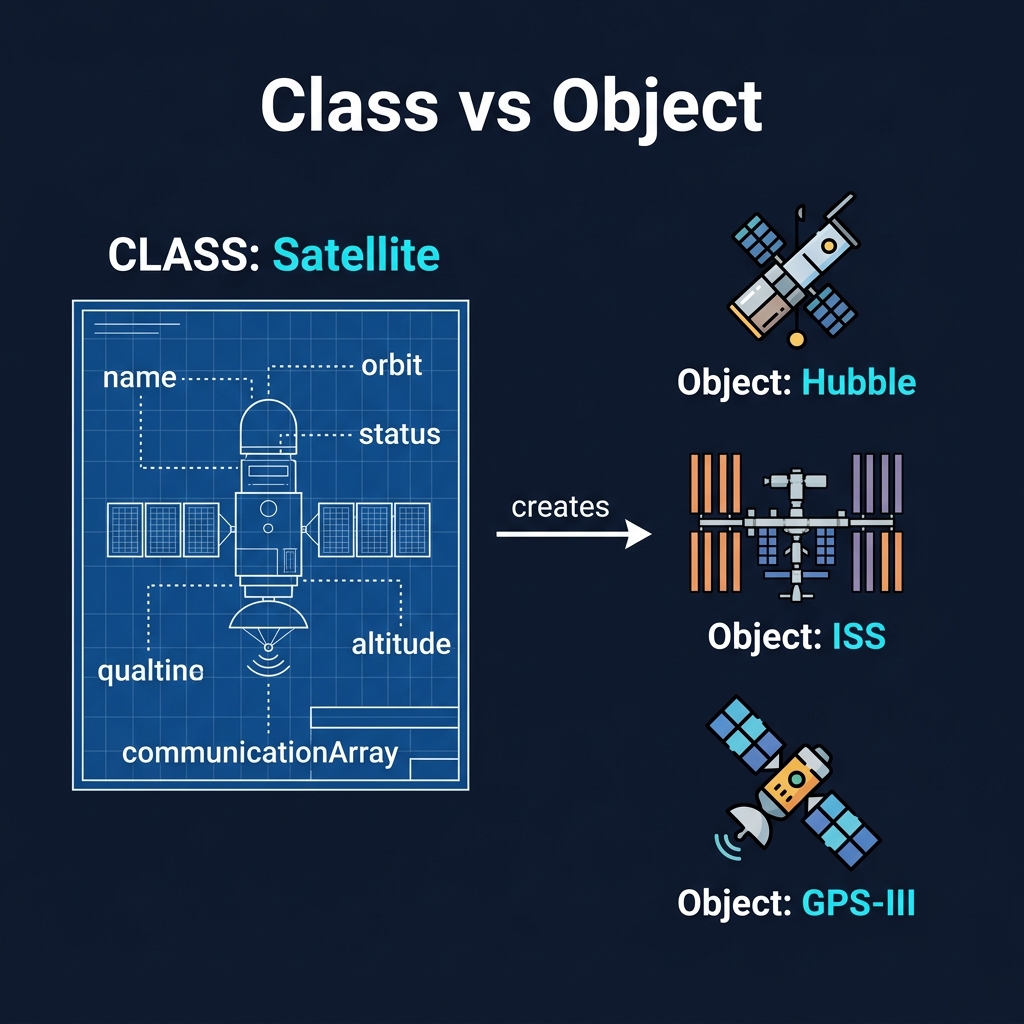
Class vs Object Satellite Blueprint Concept Diagram
2. OOP & Space Analogies

You Already Used OOP: Google Earth Engine

Here is the secret: you have been using OOP the entire time in Google Earth Engine without knowing it. Every line of GEE code is built on classes and methods:

Your GEE Code
// Class: ee.ImageCollection
// Object: the Sentinel-2 collection
var collection = ee.ImageCollection(
    'COPERNICUS/S2'
)

// Methods called on the object:
  .filterDate('2024-01-01', '2024-12-31')
  .filterBounds(roi)
  .map(maskClouds)
  .median();
The OOP Breakdown
GEE Syntax OOP Concept
ee.ImageCollection Class (the blueprint)
collection Object (specific instance)
.filterDate() Method (behavior)
.select('B4') Method (accessing attributes)
ee.Image() Another class
Takeaway:
Satellite data in Earth Engine is structured as objects. Each ee.Image encapsulates bands, metadata, and projection. The ground station code you will build follows the exact same pattern, just with hardware instead of satellite imagery.
2. OOP & Space Analogies

OOP Concept 1: Encapsulation

Encapsulation is the practice of bundling data attributes and the methods that manipulate them into a single class, while restricting direct access to the inner workings.

Why in Space Engineering? You want to protect the internal hardware state. A software module should not be able to manually overwrite the raw register values of your gyroscope sensor or solar panel voltage directly.

  • Private Members: Attributes like `_batteryVoltage` or `_calibrationMatrix` are kept hidden from the rest of the application.
  • Public Interface: We expose safe, controlled public methods like `getBatteryLevel()` or `applyCalibration()` to interact with the object safely.
πŸ’» Code Conceptual Example
class Satellite {
  // Private - hidden from outside
  private float _battery = 100.0;

  // Public - accessible safely
  public float getBatteryLevel() {
    return _battery;
  }
}
2. OOP & Space Analogies

OOP Concept 2: Inheritance

Inheritance allows a new class (subclass or child class) to inherit attributes and methods from an existing class (superclass or parent class), preventing redundant code.

Instead of re-writing basic telemetry, command queues, and hardware links for every satellite variation, we create a core base class and extend it.

πŸ›°οΈ Base Class: Satellite
Contains core functionality shared by all space systems:
- `transmitTelemetry()`
- `readOBCStatus()`
- `logData()`
πŸ“Έ Child Class: CubeSat
Inherits all parent fields, plus custom payload behaviors:
- `captureEarthImage()`
- `controlCameraSensor()`
πŸš€ Child Class: LunarLander
Inherits all parent fields, plus custom propulsion actions:
- `fireThrusters()`
- `trackAltitude()`
2. OOP & Space Analogies

OOP Concept 3: Polymorphism

Polymorphism (Greek for "many forms") is the ability of different classes to respond to the same method call in their own custom way.

Imagine your ground station software needs to talk to two types of transceivers: an XBee radio link (running over standard Serial UART) and a LoRa radio link (running over SPI).

  • We define a standardized base interface `Transceiver` with a method signature `sendData(byte[] frame)`.
  • XBeeTransceiver overrides this to output bytes using C++ `Serial.write()`.
  • LoraTransceiver overrides this to write byte strings to specific SPI registers.
  • The core Ground Station software simply calls `transceiver.sendData()`, without needing to know which physical hardware is attached.
⚠️
This keeps your code decoupled. If you upgrade your radio link hardware tomorrow, you only write a new subclass. The main ground station dashboard and telemetry software remains completely untouched.
2. OOP & Space Analogies

Check Your Understanding: OOP

Consider this code pattern:
// The ground station dashboard code:
Transceiver radio = getActiveTransceiver();
radio.transmit(telemetryPacket);  // works for ANY radio type

// Behind the scenes, 'radio' could be:
// - SerialTransceiver  (talks over COM port)
// - TCPTransceiver     (talks over network)
// - SPITransceiver     (talks over SPI bus)
// The dashboard code doesn't need to know which one!
❓ Which OOP concept allows the main ground station code to invoke a generic 'transmit()' command on a transceiver object without needing to know whether the physical connection is serial, TCP, or SPI?
3. IDEs: VS vs VS Code

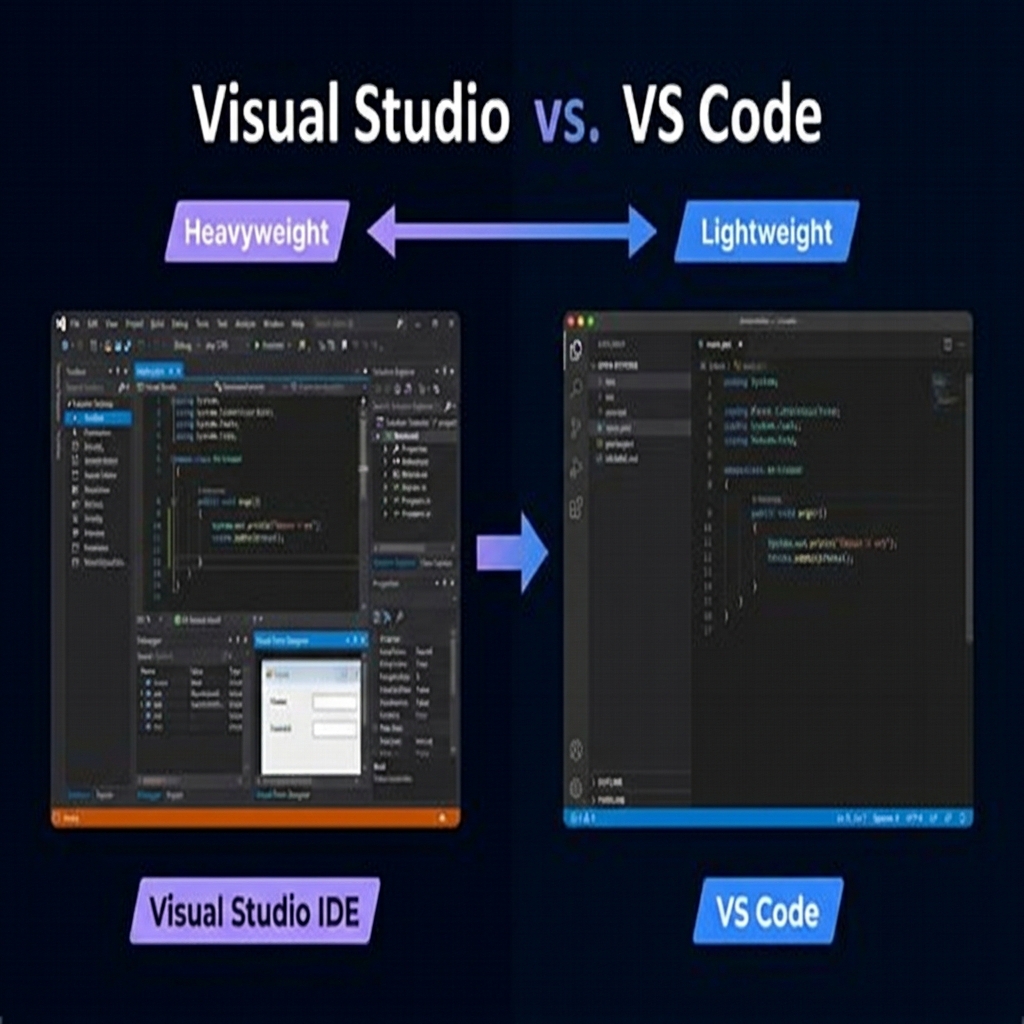
The Tools: Visual Studio vs VS Code

A major source of confusion for junior developers is the difference between Visual Studio and Visual Studio Code. Although developed by Microsoft, these tools are built for entirely different workflows. In this course, you will use both.

Feature Visual Studio (Full IDE) Visual Studio Code (Code Editor)
Core Category Heavyweight Integrated Development Environment (IDE). Lightweight, fast Source Code Editor.
Primary Usage Large-scale C#, C++, .NET enterprise, and Windows desktop application suites. Web programming (HTML/JS), Python, scripting, and embedded firmware (via PlatformIO).
GUI Builder Built-in drag and drop visual UI designers for desktop forms. No visual GUI builder; relies on web pages or custom UI libraries.
Resource Footprint Heavy (10-40 GB disk space, high RAM requirements). Lightweight (200-500 MB, launches instantly).
Course Context You will use this to build the C# .NET Windows desktop Ground Station app. You will use this for Arduino/ESP32 C++ firmware and Web dashboard frontend.
AI Copilot GitHub Copilot integrates natively. IntelliSense + Copilot suggestions inline while coding C#. GitHub Copilot extension available. Works across all languages (JS, Python, C++).
Visual Studio vs VS Code interface comparison
3. IDEs: VS vs VS Code

Compiled vs Interpreted Languages

In the bootcamp, your JavaScript ran directly in the browser with no extra steps. C, C++, and C# work completely differently: the source code must be compiled into machine code before it can run.

Interpreted (JavaScript)
script.js
  ↓ Browser reads line by line
  ↓ Executes immediately
  ↓ Errors appear at runtime
✓ No build step needed
✗ Slower execution
✗ Bugs found only when that line runs
Compiled (C / C++ / C#)
main.cpp
  ↓ Compiler analyzes ALL code
  ↓ Type-checks every variable
  ↓ Produces program.exe
  ↓ CPU runs the binary directly
✓ Fast execution (native speed)
✓ Errors caught BEFORE running
Why it matters:
When you click Build in Visual Studio, the compiler reads your entire C# project, checks every type, and produces a .exe file. If there is a single type mismatch (e.g., passing a string where an int is expected), the build fails and nothing runs. This strictness prevents bugs from reaching the satellite.
3. IDEs: VS vs VS Code

Open Source vs Closed Source Software

Once code is compiled into a binary (.exe), the original source code is no longer visible. This is the foundation of the open source vs closed source distinction.

Open Source
Source code is publicly available. Anyone can read, modify, and redistribute it.

Examples:
- Linux, Arduino IDE, Python
- VS Code (open source core)
- Your Space Apps web projects on GitHub
- Most scientific software

Licenses: MIT, GPL, Apache 2.0
Closed Source (Proprietary)
Only the compiled binary is distributed. Users run the software but cannot see or modify the code.

Examples:
- Windows OS, Adobe Photoshop
- Visual Studio (full IDE)
- SDR# (radio receiver software)
- Many commercial ground station suites

Protection: Trade secrets, licensing fees
In this course:
You will use both. Your ESP32 firmware is open source (you write and share the C++ code). The ground station desktop app you build in Visual Studio could be distributed as a compiled .exe without revealing your source code.
3. IDEs: VS vs VS Code

The .NET Framework Ecosystem

When you build the ground station desktop application in Visual Studio, you are building on top of Microsoft's .NET Framework. It provides a massive library of pre-built code so you do not have to write everything from scratch.

C# Language
The programming language you write in. Object-oriented, type-safe, similar to Java. All your ground station logic is written in C#.
.NET Runtime (CLR)
The engine that runs your compiled C# code. Handles memory management, security, and cross-platform compatibility automatically.
WinForms / WPF
UI frameworks for building Windows desktop apps. Drag-and-drop buttons, text fields, charts, and serial port panels.
System.IO.Ports
The .NET library for serial communication. You will use SerialPort.Open(), .Read(), .Write() to talk to the TNC and radio hardware.
NuGet Packages
Like npm for JavaScript. Install third-party libraries (charting, JSON parsing, database connectors) with a single command.
Solution / Project
A Solution (.sln) is the top-level container. It holds one or more Projects (.csproj), each producing a separate .exe or .dll.
Think of it like this:
.NET is to C# what the Browser is to JavaScript. The browser gives you document.getElementById(), fetch(), and the DOM. .NET gives you SerialPort, File.ReadAllBytes(), and Windows UI components.
3. IDEs: VS vs VS Code

Getting Started with Visual Studio

Here is the step-by-step workflow you will follow to create your ground station desktop application in Visual Studio:

Step 1: Launch and Create New Project
Open Visual Studio → "Create a new project" → Search for "Windows Forms App (.NET)" → Select C# → Name your project (e.g., ISU_GroundStation) → Click Create.
Step 2: Understand the Solution Explorer
The right panel shows your project tree. Form1.cs is your main window. Form1.Designer.cs is auto-generated UI code. Program.cs is the entry point (Main() function). Double-click Form1 to open the visual designer.
Step 3: Design Your UI (Drag and Drop)
From the Toolbox (left panel), drag components onto your form: Buttons, TextBoxes, Labels, ComboBox (for COM port selection), a RichTextBox (for telemetry display), and a Chart control (for live data plotting).
Step 4: Add Serial Port Component
Drag a SerialPort component from the Toolbox onto your form. Set properties: BaudRate = 115200, DataBits = 8, Parity = None, StopBits = One. This connects your app to the TNC hardware.
Step 5: Build and Run
Press F5 (or the green Play button). Visual Studio compiles your C# code, checks for errors, and if successful, launches your .exe application. The Output window shows build status and any compiler errors.
4. AI-Assisted Coding

AI Coding Assistants: Power & Limits

Modern software engineering in 2026 relies heavily on AI-assisted coding tools (like Gemini, GitHub Copilot, or Cursor). These tools are incredibly powerful junior coding partners, but they require a critical mental guardrail.

🟒 What AI is Great For
- Generating boilerplate templates (e.g., C# class setups).
- Synthesizing syntax structures (e.g., regex, struct formats).
- Explaining errors and recommending optimizations.
- Finding typos or unhandled cases in code.
πŸ”΄ Crucial AI Limitations
- AI does not understand the hardware wiring constraints.
- AI frequently makes logical assumptions and silent hallucinations.
- Blindly copying AI code without understanding it leads to fragile systems.
🚨
The Golden Rule: AI assistants accelerate typing and debugging, but they never replace the developer's responsibility to understand, trace, and verify every single line. In space engineering, an unverified AI block can lead directly to Loss of Mission (LOM).

Setting Up AI Assistants in Your IDEs

VS Code
GitHub Copilot:
Extensions panel → Search "GitHub Copilot" → Install → Sign in with GitHub (free for students).

Gemini Code Assist:
Extensions panel → Search "Gemini Code Assist" → Install → Sign in with Google account.

Both provide inline completions, chat sidebar, and code explanations for JS, Python, C++, and Arduino sketches.
Visual Studio
GitHub Copilot:
Extensions → Manage Extensions → Search "GitHub Copilot" → Install → Restart VS. Native IntelliSense integration for C#/.NET.

Gemini Code Assist:
Extensions → Search "Google Cloud Code" → Install → Enable Gemini. Provides inline suggestions and chat for .NET projects.

In Visual Studio, Copilot integrates directly with the debugger and solution explorer for deeper C# support.
4. AI-Assisted Coding

Check Your Understanding: AI in Coding

❓ Why is blindly pasting AI-generated code particularly dangerous in satellite ground station middleware development?
5. Intermission Break

Intermission: 15-Minute Break

Take a quick stretch, grab some coffee, and process the structural concepts of OOP before we deep-dive into binary telemetry frames and serialization!

15:00
Ready to count down.
6. Binary & Telemetry Parsing

Hardware Telemetry: ESP32 & XBee Links

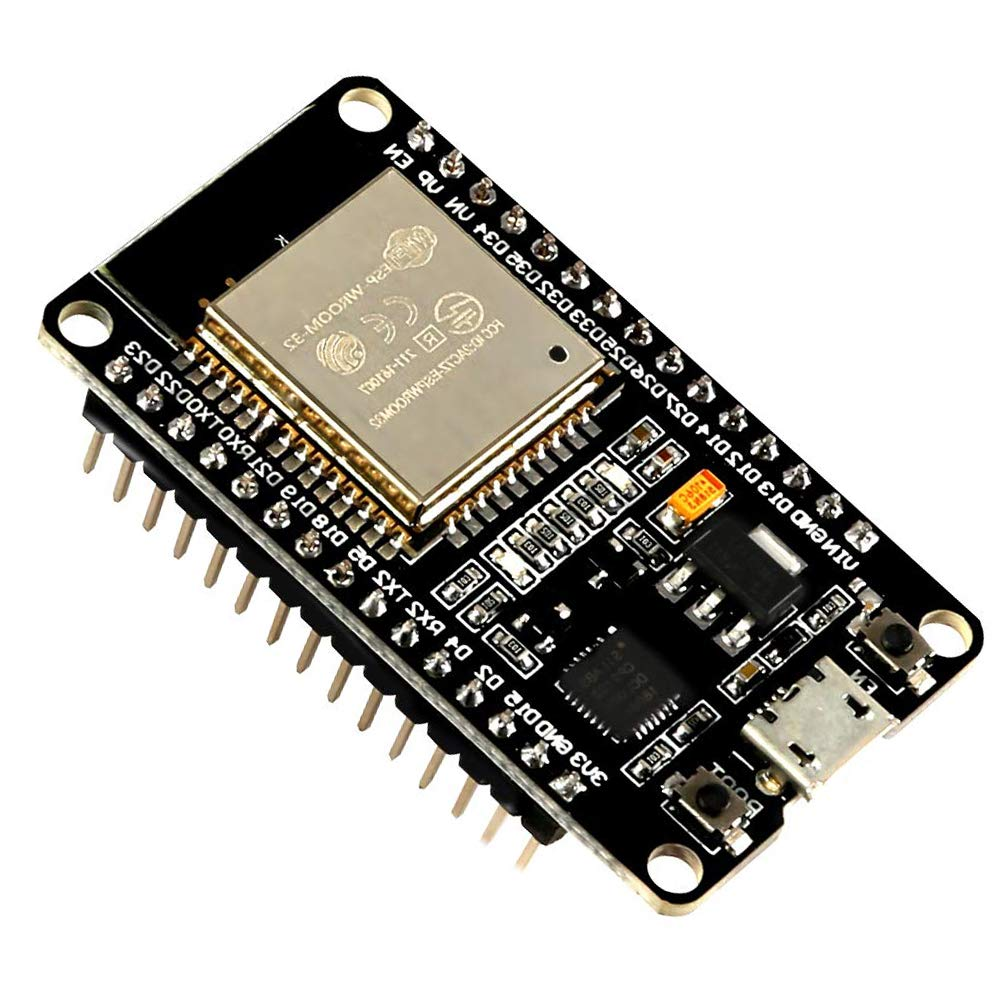
In your upcoming lab, your satellite is driven by an ESP32 microcontroller. It communicates telemetry and receives commands over an XBee radio module using a Serial UART connection configured at 115200 baud.

  • ESP32 Satellite Hub: Coordinates onboard systems, reads sensors (BME280 for temp/humidity, MPU6050 for acceleration/rotation), and drives an OV2640 camera payload.
  • XBee Transceiver: Standardizes radio frequency (RF) packets, exposing them to the ESP32 as simple RX/TX serial pins (UART2).
  • Baud Rate (115200): The clock speed of the serial interface, representing the transmission of 115,200 raw bits per second.
πŸ“‘
The Core Concept: Over long-distance, low-power satellite radio links, bandwidth is extremely constrained. We cannot afford the overhead of transmitting data as human-readable strings or structured JSON packets.
6. Binary & Telemetry Parsing

Why Binary Frames? JSON vs Hex

Let's compare transmitting a single telemetry coordinate (temperature = 25.46) over a radio link:

❌ Approach A: JSON String
Text representation:
{"temp":25.46}
- Size: 15 characters = 15 bytes.
- Parser needed: A text parsing engine must run on the receiving microcomputer.
βœ… Approach B: Packed Binary float
IEEE 754 float bytes in hex:
0x41CBAD70
- Size: Exactly 4 bytes.
- Parser needed: Zero string parsing. Raw bytes map directly into memory.
βš™οΈ
Packed Structs: By wrapping variables in a C/C++ `struct` on the ESP32, the compiler aligns them side-by-side in memory. We can then send the raw memory directly as a stream of bytes.
6. Binary & Telemetry Parsing

Anatomy of a Telemetry Frame

Dr. Ramson's satellite firmware packages sensor values into a rigid binary packet containing specific landmarks:

  • Header (0xA1B2C3D4): A static 4-byte marker. The ground station monitors incoming serial data searching for this exact sequence to know a telemetry packet has arrived.
  • Payload: Sensor IDs followed by three 4-byte floating point variables representing active sensor outputs (e.g., Temp, Hum, Press).
  • Footer (0x1E2D3C4B): A static 4-byte trailing marker, confirming the packet is complete and was not corrupted during transmission.
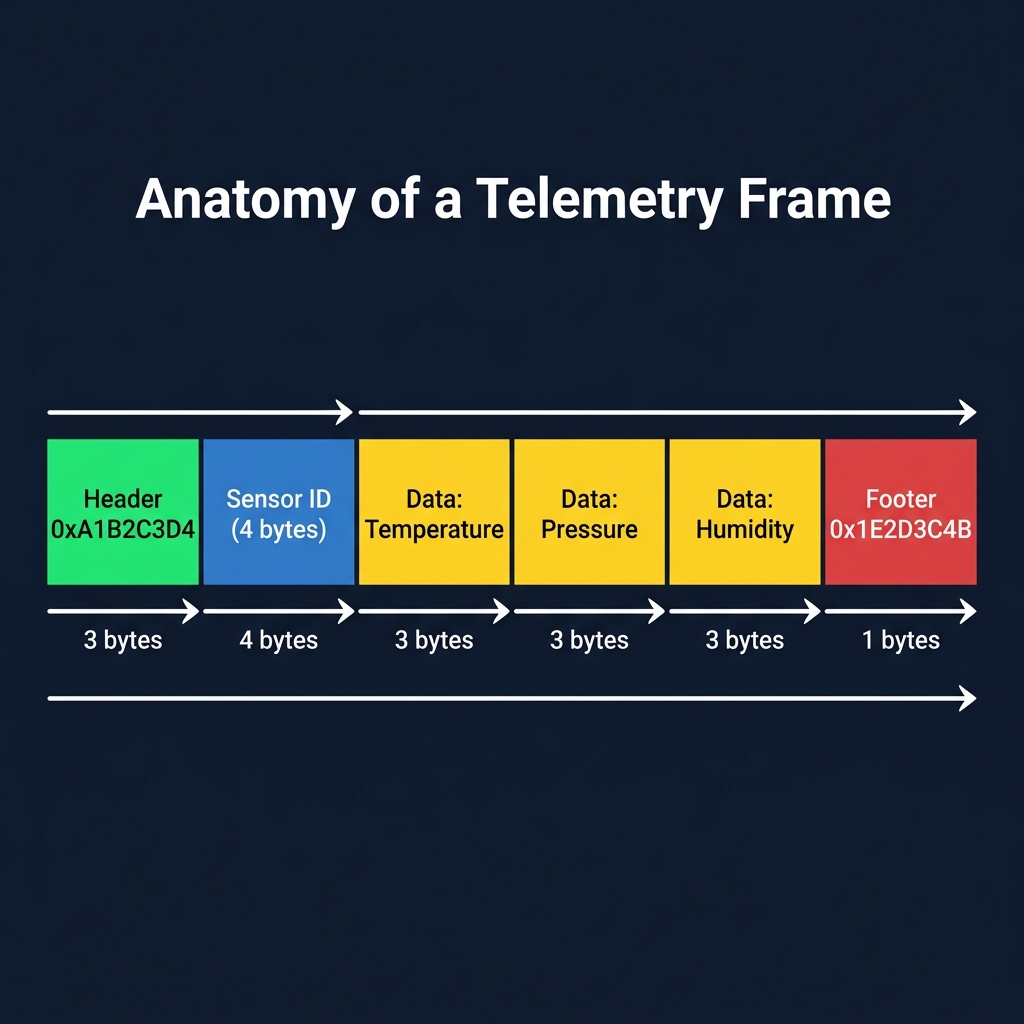
Anatomy of a Binary Telemetry Frame Diagram
6. Binary & Telemetry Parsing

How the Backend Parses the Bytes

On the ground station server, your Python/C# backend opens a connection to the serial port. It continuously reads bytes, looking for the header. Here is a simplified visual representation of the byte-unpacking pipeline:

πŸ”„ The Telemetry Unpacking Pipeline
1. Read Serial Buffer
[0xA1, 0xB2, 0xC3, 0xD4, 0x02, ...]
2. Align Header
Validate 0xA1B2C3D4 Marker
3. Unpack Payload
Read sensor structs (floats)
4. Check Footer
Validate 0x1E2D3C4B

In Python, we unpack raw binary lists into standard variables using the struct library:

import struct
# Unpack 4-byte header, 1-byte sensor ID, and three 4-byte floats
header, sensor_id, val1, val2, val3 = struct.unpack('<I B f f f', raw_bytes[0:17])
6. Binary & Telemetry Parsing

Code Review: Header vs Source Separation

In your satellite firmware lab, you will see code split into .h (headers) and .cpp (sources). This separation of concerns represents the physical boundaries of your software components.

πŸ“‹ The Public Interface (sensors.h)
Declares the types and names of functions so other files can see them:
// Header guards prevent multiple inclusions
#ifndef SENSORS_H
#define SENSORS_H

#include <Arduino.h>

// Declare public functions (The Interface Contract)
bool init_sensors();
void transmit_data(float &temperature, float &pressure,
                   float &humidity, float &gx,
                   float &gy, float &gz,
                   float &ax, float &ay,
                   float &az);

#endif
βš™οΈ The Private Implementation (sensors.cpp)
Implements the physical logic declared in the header:
#include "sensors.h"
#include <Adafruit_BME280.h>

Adafruit_BME280 bme; // Private hardware object

bool init_sensors() {
  // Configure pins SDA=13, SCL=15 and start I2C sensor
  Wire.begin(13, 15);
  return bme.begin(0x76, &Wire);
}
6. Binary & Telemetry Parsing

Code Review: sensors.cpp transmit_data()

Let's review the critical code that packages sensor data into a raw binary frame and streams it over the XBee radio interface.

// 1. Pack telemetry into an aligned memory structure
struct TelemetryFrame {
  uint32_t header = 0xA1B2C3D4; // 4 bytes
  uint32_t sensor_id;           // 4 bytes
  float    data[3];             // 12 bytes
  uint32_t footer = 0x1E2D3C4B; // 4 bytes
};

void transmit_data(float &temperature, ...) {
  TelemetryFrame frame;
  frame.sensor_id = 0x00000002; // BME280 ID
  frame.data[0]   = temperature;
  frame.data[1]   = pressure;
  frame.data[2]   = humidity;

  // 2. Cast struct to a byte array and stream it over Serial2
  Serial2.write((uint8_t *)&frame, sizeof(frame));
}
⚑
How Casting Works: &frame gets the starting address of the struct in RAM. (uint8_t *) tells the microcontroller: "treat this block of memory as an array of individual bytes." sizeof(frame) tells it how many bytes to write.
πŸ’‘
Why This Matters: JavaScript developers are used to converting objects to JSON strings. In embedded systems, serialization is instant and consumes zero CPU overhead because we stream the raw memory block directly to the radio!
6. Binary & Telemetry Parsing

Variable Payload: The Camera JPEG Framing Protocol

Fixed-size telemetry frames (like our 56-byte sensor struct) are predictable because variable positions in memory never change. However, when the satellite transmits an **image capture**, the payload size changes with every picture. We must use a variable-length framing protocol.

Field Size Value Pedagogical Purpose
Header 4 bytes 0xDEADBEEF Identifies the start of an image stream instead of a telemetry frame.
Size 4 bytes image_size Tells the ground station exactly how many payload bytes to read.
Payload Variable Raw JPEG bytes The physical image buffer (starts 0xFFD8, ends 0xFFD9).
Footer 4 bytes 0xFEEDFACE Confirms the full image completed transmission without data corruption.
βš™οΈ How the Middleware Unpacks Variable Images (C# / Python)

Because the payload is variable, the ground station cannot read a static struct size. It must execute a **two-phase read**:

  1. Read 8 bytes to verify 0xDEADBEEF and extract the 32-bit size integer (N).
  2. Execute a blocked read for exactly N bytes to fetch the JPEG data, followed by 4 bytes to check the 0xFEEDFACE footer.
// Read image size from stream (4 bytes)
byte[] sizeBuffer = readBytes(4);
int imgSize = convertToInt(sizeBuffer);

// Read the exact JPEG data
byte[] jpegData = readBytes(imgSize);
7. Ground Station Architecture

End-to-End: The Telemetry Lifecycle

How does a physical physical phenomenon (like temperature) on a satellite in space travel all the way to a text character on your ground station browser dashboard? Let's trace the physical and logical lifecycle:

🌑️
1. Sensor BME280 measures physical air temp and converts to analog electrical state.
πŸ‘Ύ
2. Firmware ESP32 reads sensor via I2C interface, packs float in struct, and streams via UART2.
πŸ“‘
3. Radio XBee converts UART bytes to RF waves; Ground antenna receives RF and outputs USB.
βš™οΈ
4. Middleware Python/C# parses COM port, checks header alignment, and saves floats.
🌐
5. Network Backend pushes data payload to WebSocket or HTTP API endpoints in real-time.
πŸ’»
6. Web UI Leaflet/JS receives value, plots on real-time graph, and updates DOM.
πŸ’‘
Pedagogical Insight: This complete pipeline is why we call it **Full Stack Systems Engineering**. A failure anywhere in this chain causes telemetry blackouts. Troubleshooting requires tracking values segment-by-segment!
7. Ground Station Architecture

Full Stack Ground Station Architecture

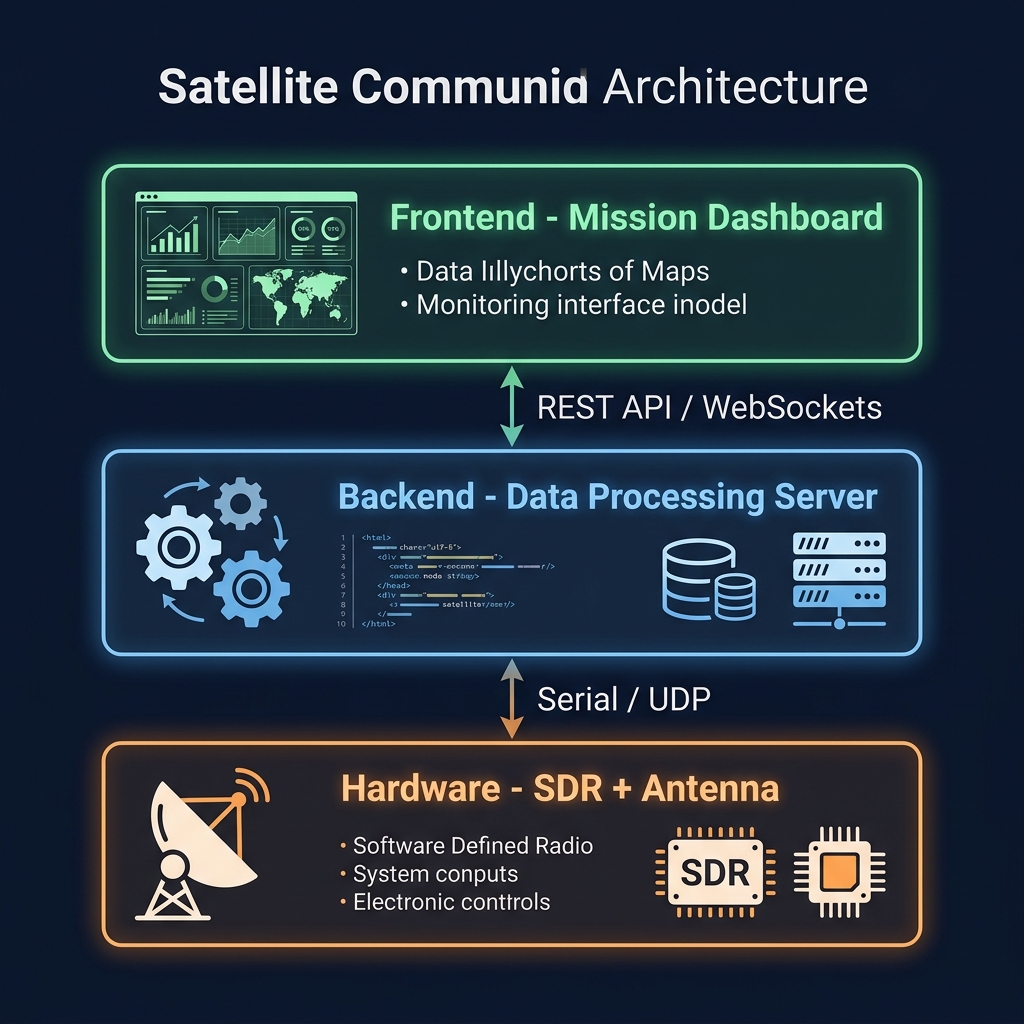
A comprehensive ground station architecture is a multi-layered system, bridging raw hardware streams up to web-based dashboards.

  • Physical/Hardware Layer: The satellite orbital transceivers and antennas communicating RF signals.
  • Middleware/TNC Layer: A Terminal Node Controller (TNC) like the Kantronics 9612XE, running in KISS mode to package raw radio packets into clean serial structures.
  • Backend/Server Layer: Opens the serial ports, validates frames, archives telemetry to database, and schedules commands.
  • Frontend Dashboard Layer: Updates real-time dials, track map, and visualizes status changes.
3-Layer Full Stack Ground Station Architecture Diagram

Hardware You Will Work With

ESP32 Microcontroller
Runs the satellite firmware (C++). Reads sensors, captures images, transmits binary telemetry via UART.
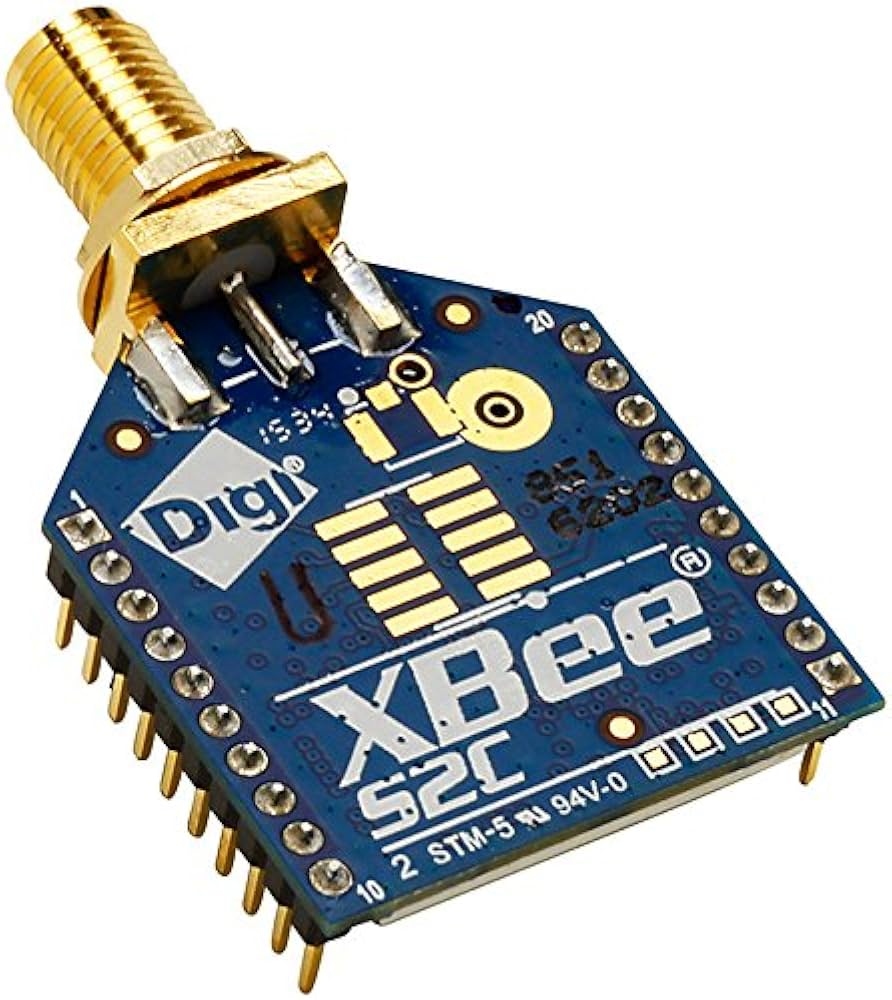
XBee S2C Transceiver
Radio link between satellite and ground station. Communicates via serial UART at 115200 baud.
7. Ground Station Architecture

The Finished Ground Station Dashboard

In your upcoming lab, your C# or Python full stack backend will drive an integrated Web Dashboard UI representing your primary control terminal.

  • Satellite Track Map: An interactive map plotting predicted orbital passes and live positions.
  • Command Terminal: Interactive buttons to construct and send hex command frames (like capturing an image or switching radio channels).
  • Live Telemetry Dashboard: Responsive gauges and charts graphing temperatures, battery, and gyroscopic orientation dynamically.
  • Camera JPEG Viewer: Displays image telemetry rebuilt byte-by-byte from satellite transmissions.
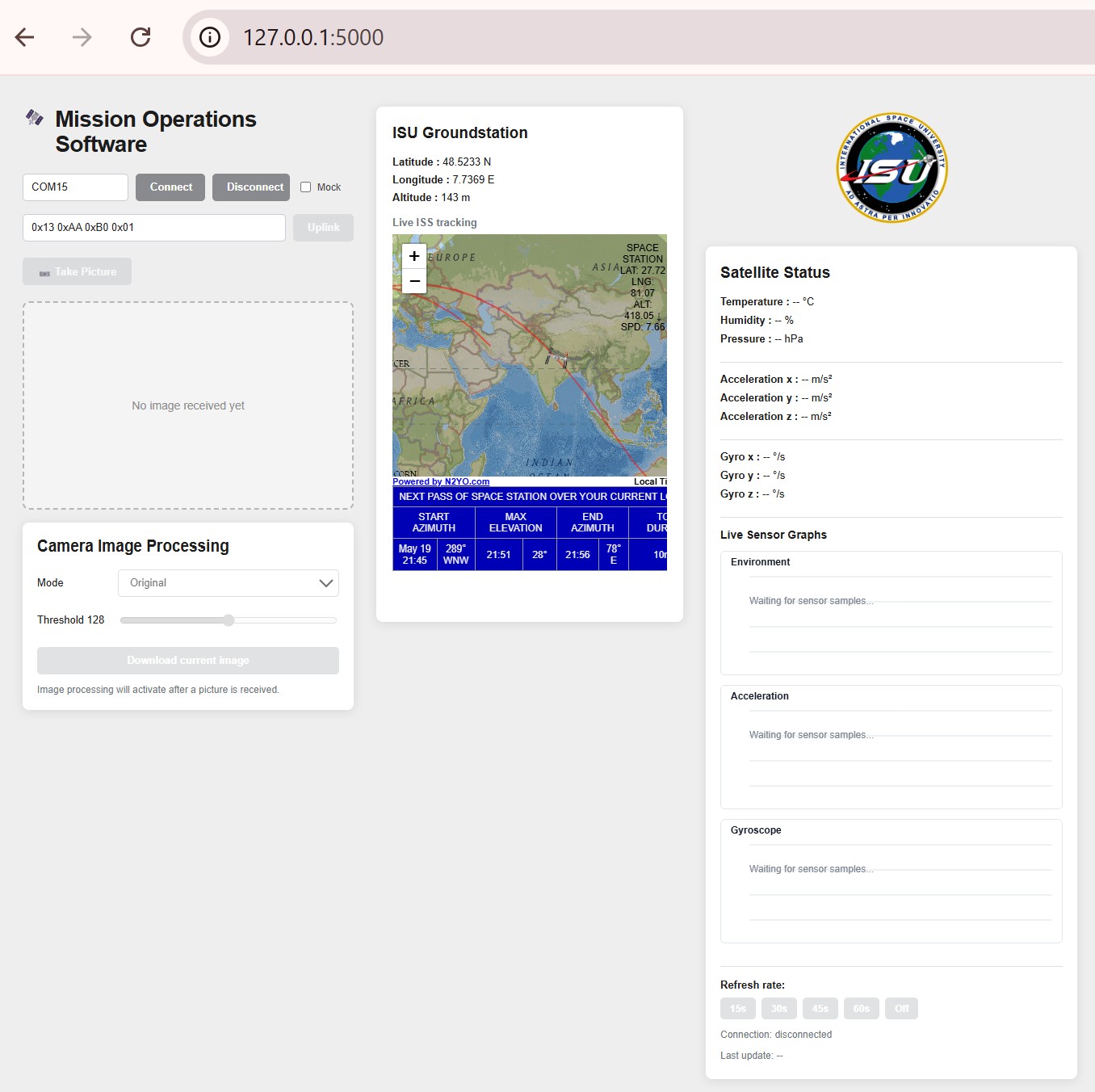
Ground Station Web Dashboard Interface Screenshot
7. Ground Station Architecture

Interactive Demo: Parsing Telemetry

This is what your ground station software does every second. Click Parse Next Field to step through a real telemetry frame byte by byte.

Raw Bytes Received from XBee Serial Port:
A1 B2 C3 D4 00 00 00 01 41 CB AE 14 00 00 00 02 42 CA E1 48 00 00 00 03 41 20 00 00
Parsed Output:
7. Ground Station Architecture

Tools of the Trade: Your Lab Environment

To construct, test, and debug this full stack ground system, you will use several key utility tools throughout your laboratory weeks:

πŸ“» SDR# (Software Defined Radio)
Visualize live radio frequency (RF) spectrum. You will use this to monitor satellite radio carrier signals and verify signal modulation.
πŸ“Ÿ Realterm (Serial Terminal)
A capture tool to log raw serial byte streams from USB connections, allowing you to debug hex packets outside your code.
πŸ—ΊοΈ Orbitron (Pass Predictor)
Calculates satellite orbits, predicting the exact dates and times when a satellite will pass over the Strasbourg ground station antenna.
βš™οΈ Zadig (USB Driver Utility)
A helper app used to replace default Windows USB drivers with generic libusb drivers, letting your SDR software access the receiver hardware directly.
7. Ground Station Architecture

Check Your Understanding: Telemetry

❓ Why does the receiving ground station software check for specific header (0xA1B2C3D4) and footer (0x1E2D3C4B) bytes in incoming radio streams?
8. Summary & Glossary

Glossary & Summary of Big Ideas

Here are the core concepts and vocabulary from today's lecture. Review these as you launch into your laboratory experiments:

Blueprint (Class)
A class template defining structures and algorithms (attributes/methods) shared by all instances of an object.
Instance (Object)
A physical realization of a class template occupying its own space in system memory.
Encapsulation
Restricting direct read/write access to internal fields, exposing control only through safe public methods.
Polymorphism
Using a common interface pattern that adapts its implementation depending on the specific child object subclass.
Binary Frame
A compact sequence of raw bytes containing headers, payload variables, and footers, optimized for radio links.
Baud Rate
The data signaling rate of serial links, indicating the number of bits transferred per second.
KISS Mode
"Keep It Simple, Stupid" framing protocol used by TNCs to packetize raw telemetry frames for computer interfaces.
IDE vs Code Editor
A full compiler-linked suite with GUI designers (Visual Studio) vs a fast, lightweight modular text workspace (VS Code).
8. Summary & Glossary

Launch Your Ground Station Lab!

Congratulations! You have completed the foundational lecture on Object-Oriented Programming and Space Full-Stack middleware. You are ready to start building!

0 / 3
Live Quizzes Solved
100%
Foundational Prep

πŸ“‹ Dynamic Operational Readiness Checklist

βšͺ OOP Foundations: Pending Quiz
βšͺ AI & IDE Rules: Pending Quiz
βšͺ Telemetry & Parsing: Pending Quiz
βšͺ System Operations: Pending Prep
πŸš€
What's Next? In your upcoming lab, you will open Visual Studio to implement your custom Windows C# ground station dashboard, interface with serial transceivers, decode ESP32 binary frames, and monitor telemetry in real-time!
Return to AS26 Hub
Slide 1 of 40
Press keys: ← β†’