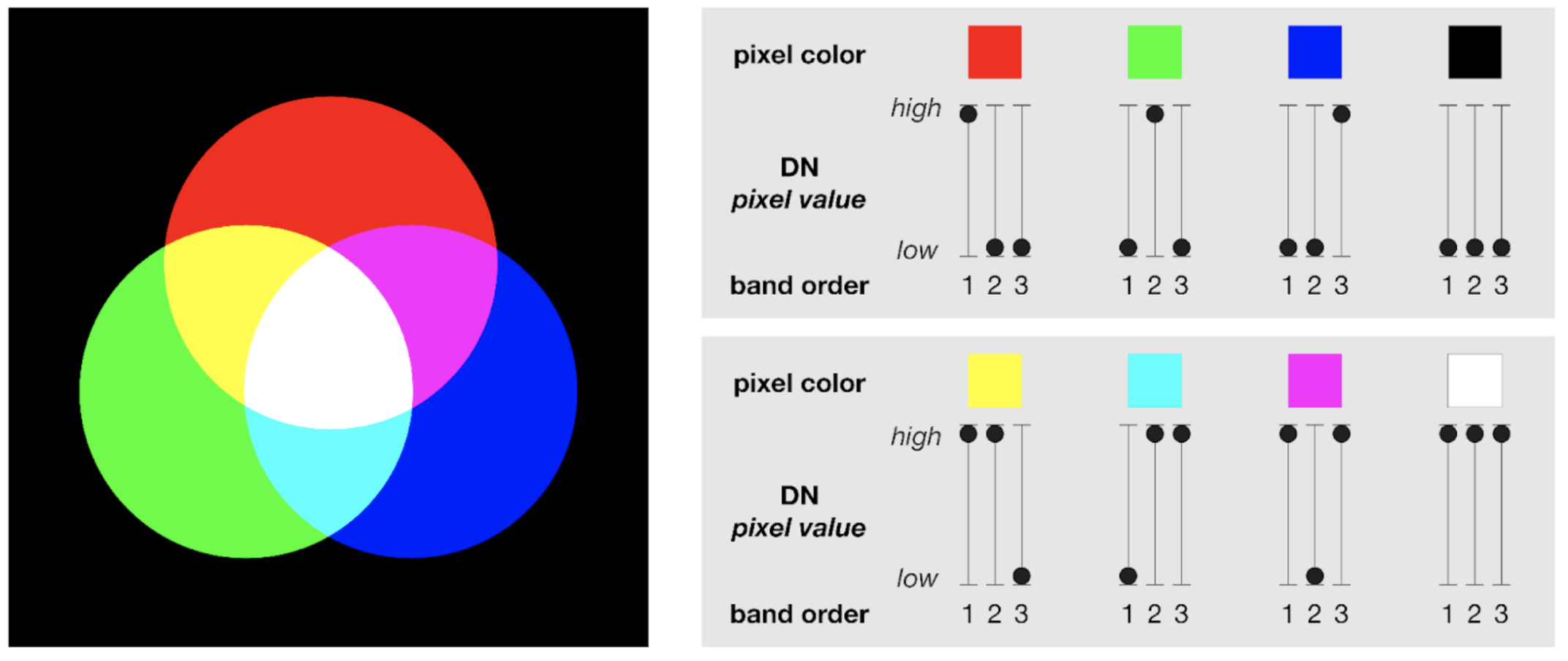
Here is something that surprises many of our students. Screens use additive color: red, green, and blue light combine to make the colors we see on screen. Understanding RGB helps you pick bands for true-color and false-color composites in Earth Engine.
Learning objectives
- Explain how red, green, and blue channels mix in additive color.
- Predict how band order affects composite appearance.
- Relate pixel values to brightness and color tint.
- Apply the concept when choosing bands for visualization.
Why it matters
When you know how RGB blending works, we can design composites that highlight vegetation, water, burn scars, or urban areas instead of guessing colors.
How additive color works
- Three channels: Red, Green, Blue.
- 0,0,0: No light = black.
- 255,255,255: Full light = white.
- Primary mixes: Red + Green = Yellow; Green + Blue = Cyan; Red + Blue = Magenta.
Examples of RGB values
Example values used for Florida school colors:
- Florida Orange:
250, 70, 22 - Florida Blue:
0, 33, 165

Why band order matters
In a composite, the first band you supply feeds the red channel, the second feeds green, the third feeds blue. A pixel appears tinted toward whichever band has the highest value relative to the others.
Try it in the Code Editor
Create two composites from the same Landsat image:
var img = ee.Image('LANDSAT/LC08/C02/T1_L2/LC08_044034_20210623')
  .multiply(0.0000275).add(-0.2);

// True color
Map.addLayer(img, {bands: ['SR_B4', 'SR_B3', 'SR_B2'], min: 0, max: 0.3}, 'True color');

// Color infrared (NIR, Red, Green)
Map.addLayer(img, {bands: ['SR_B5', 'SR_B4', 'SR_B3'], min: 0, max: 0.3}, 'Color IR');
Toggle the layers and note how vegetation pops in the color infrared view.
Common mistakes
- Forgetting to scale Level-2 data before visualizing.
- Swapping band order unintentionally, leading to confusing colors.
- Assuming higher values always mean brighter in the final color-relative channel balance matters.
Quick self-check
- What happens to a pixel when red and green values are high but blue is low-
- Which channel order highlights vegetation as bright red in a false-color composite-
- Why does scaling radiance/reflectance matter before visualization-
Next steps
- Experiment with different band orders in your own imagery.
- Combine this knowledge with Band Arithmetic to design targeted composites.