Why Data Fusion?
Satellite imagery gives us global coverage and temporal depth. Drone imagery gives us centimeter-level resolution and on-demand flexibility. Data fusion combines the strengths of both, creating mapping products that neither platform can achieve alone. This briefing introduces the concepts, the hardware we will use, and the multi-day assignment that follows.
Satellite
Global coverage, multi-spectral bands, revisit cycles of days to weeks. Resolution: 10m (Sentinel-2) to 0.5m (commercial).
Drone (UAS)
On-demand, cm-level resolution, 3D reconstruction via photogrammetry. Limited coverage area per flight.
Data Fusion
Combine satellite's spectral depth with drone's spatial detail. Applications in precision agriculture, urban mapping, disaster response.
Our Platform: DJI Neo
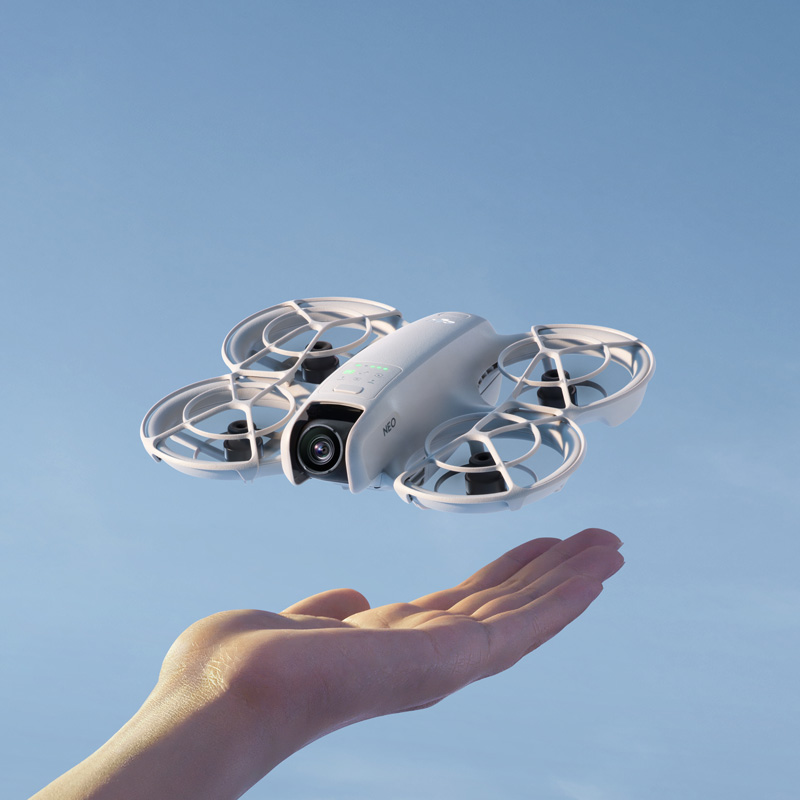
DJI Neo: Palm-sized, 135g, EU C0 class. No pilot license required.
For this assignment, we will use the DJI Neo, an ultra-compact drone weighing just 135g. Its C0 classification under EU drone regulations means it can be flown without a pilot license in most open areas, making it ideal for educational campus mapping exercises.
Despite its small size, the Neo captures 4K video and 12MP photos with electronic image stabilization, and features GPS/Galileo/BeiDou positioning for geotagged imagery. We will fly it over the ISU campus to collect overlapping aerial photographs for photogrammetric processing.
Key Specifications
| Parameter | Value |
|---|---|
| Takeoff Weight | ~135 g |
| Dimensions | 130 x 157 x 48.5 mm (L x W x H) |
| Max Flight Time | ~18 min (~17 min with prop guards) |
| Max Flight Distance | 7 km |
| Max Horizontal Speed | 16 m/s (Manual mode) |
| Max Takeoff Altitude | 2,000 m |
| Wind Resistance | 8 m/s (Level 4) |
| Operating Temp | -10 to 40 °C |
| GNSS | GPS + Galileo + BeiDou |
| Hover Precision (GNSS) | Vertical: ±0.5 m | Horizontal: ±1.5 m |
| Hover Precision (Optical) | Vertical: ±0.1 m | Horizontal: ±0.3 m |
| EU Drone Class | C0 (no license required) |
| Camera Parameter | Value |
|---|---|
| Image Sensor | 1/2-inch CMOS |
| Lens FOV | 117.6° (14mm equivalent) |
| Aperture | f/2.8 |
| Focus Range | 0.6 m to infinity |
| Max Photo Resolution | 12 MP (4000 x 3000) |
| Video Resolution | 4K at 30fps (3840 x 2880 in 4:3) |
| Video Stabilization | RockSteady EIS + HorizonBalancing |
| ISO Range | 100 - 6,400 |
| Shutter Speed | 1/8000 to 1/10 s (photo) |
| Internal Storage | 22 GB |
| Gimbal | 1-axis mechanical (tilt: -90° to 60°) |
| Color Profiles | Normal |
| Transmission | Value |
|---|---|
| Video Transmission | DJI O4 (up to 1080p/60fps live view) |
| Max Range (FCC) | 10 km (unobstructed, no interference) |
| Max Range (CE/EU) | 6 km (unobstructed, no interference) |
| Urban Range (realistic) | ~1.5 - 3 km |
| Wi-Fi Download Speed | 25 MB/s |
| Latency | ~120 ms (with RC-N3) |
Mapping with the DJI Neo: "Hard Mode"
The Challenge
DJI has not released the Mobile SDK for the Neo. This means professional mapping apps like DroneDeploy, Pix4Dcapture, or Dronelink cannot communicate with it. You cannot press a button and watch it fly a perfect automated grid pattern. We have to fly manually, and that is part of the learning experience.
Method 1: Manual "Lawnmower" Grid
Set up Timed Shots
In the DJI Fly app, set the camera to Interval Photo mode (a photo every 2 seconds). This way, you just need to fly the pattern while the camera continuously captures images.
Fly Straight, Parallel Lines
Maintain a constant altitude (higher is better for mapping, as it reduces perspective distortion). Fly in straight lines back and forth across the site, like mowing a lawn. Keep a steady, slow speed.
Ensure Overlap
Aim for 70-80% forward overlap and 60-70% side overlap. The Neo's ultra-wide lens (117.6° FOV, ~14mm equivalent) captures wide frames, but be aware of fisheye distortion at the edges, which can affect photogrammetry alignment.
Method 2: Orbit / POI for 3D Models
For mapping a single building or small site, the Neo's built-in Orbit mode is very effective. The drone flies a perfect circle while keeping the camera centered on the subject. Record in 4K video during the orbit, then extract frames from the video (every 1-2 seconds) to use as input photos for 3D reconstruction. This is a standard workaround for drones without mapping software.
Method 3: Video Frame Extraction
If taking timed photos is impractical, simply record the entire flight as a 4K video. Then use FFmpeg or a similar tool to extract frames at regular intervals. Since the Neo writes GPS data to video metadata, you can reconstruct approximate positions. This approach works surprisingly well for small-area 3D models.
Processing the Data
Once you have your photos (manual capture or extracted from video), the Neo writes GPS coordinates to the JPEG EXIF metadata, so images are automatically georeferenced. Use one of these tools:
WebODM (Open Drone Map)
Open-source, free. Runs locally via Docker. Handles manual datasets well, generates orthomosaics, DSM, point clouds, and 3D textured meshes. Ideal for educational use.
Agisoft Metashape
Professional standard. Accepts any JPEG input. Produces high-quality orthomosaics, dense point clouds, and textured 3D models. Educational licenses available.
Pix4Dmapper
Industry leader. Cloud or desktop processing. Strong quality reports and accuracy metrics. Will process Neo JPEGs just like any other drone.
DJI Terra
DJI's own software. Can process images even if the drone did not fly an "official" automated mission. Good integration with DJI hardware.
Building a 3D Model from Drone Images
Yes, we can absolutely turn the Neo's images into a 3D model. Here is the photogrammetric pipeline:
Image Acquisition
Capture 50-200+ overlapping photos from multiple angles. For a building: orbit at 2-3 different altitudes. For terrain: fly a grid pattern. More overlap = better reconstruction.
Feature Matching (SfM)
Structure from Motion algorithms identify matching features across images and compute camera positions. The software determines exactly where each photo was taken and what it was looking at.
Dense Point Cloud
Once camera positions are known, the software generates millions of 3D points by triangulating corresponding pixels across multiple images. Each point has x, y, z coordinates and RGB color.
Mesh & Texture
Points are connected into a triangulated mesh (the 3D surface), then original photos are projected onto the mesh as a texture. The result: a photorealistic 3D model you can rotate, zoom, and measure.
Export & Deliverables
Export as: orthomosaic (GeoTIFF for GIS), DSM (elevation raster), 3D model (OBJ/PLY for visualization), or point cloud (LAS/LAZ for analysis). All are georeferenced using the GPS from the drone.
Reality Check: Neo vs. Dedicated Mapping Drones
| Feature | DJI Neo | Dedicated Mapping Drone |
|---|---|---|
| Automated Grid Flight | None (manual only) | Full waypoint/grid automation |
| GPS Accuracy | Consumer-grade (±1.5m) | RTK available (±2cm) |
| Camera | 12MP, 1/2" sensor, f/2.8 | 20-48MP, 1" sensor, mechanical shutter |
| Lens Distortion | High (ultra-wide 117.6° FOV) | Low (standard FOV 82-84°) |
| Shutter Trigger | Interval timer only | Distance-based triggering |
| Flight Time | ~18 min | 30-45 min |
| Mapping Suitability | Casual / small sites / educational | Professional / survey-grade |
The Pedagogical Value
The DJI Neo's limitations are actually features for learning. Flying a manual grid forces you to understand overlap geometry, flight planning, and altitude trade-offs in a way that pressing "Start Mission" in DroneDeploy never would. You learn photogrammetry from first principles, not from software automation. And the 3D models it produces are genuinely impressive for a 135g palm-launched drone.
Assignment: Campus Mapping & Data Fusion
This multi-day assignment spans from May 5 to May 7. Today's briefing introduces the concepts. On May 7, we will conduct the drone flight and begin image processing as a group lab.
Data Collection (May 7)
Fly the DJI Neo over the ISU campus in a systematic grid pattern. Collect overlapping aerial photographs (70-80% overlap) for photogrammetric reconstruction. Record flight parameters, altitude, and weather conditions.
Photogrammetric Processing
Process the drone imagery using photogrammetry software to generate mapping products: orthomosaic (geometrically corrected aerial map), point cloud (3D surface), and DSM/DTM (digital surface/terrain model).
Satellite Comparison
Acquire satellite imagery of the same area from Google Earth Engine (Sentinel-2, Landsat, or high-res commercial data). Compare spatial resolution, spectral information, and temporal coverage with the drone products.
Data Fusion & Analysis
Integrate satellite spectral data with drone spatial detail. Explore applications: vegetation health mapping (combining NDVI with high-res texture), building footprint extraction, or change detection. Produce a final fused mapping product.
Satellite vs. Drone: A Comparison
| Characteristic | Satellite | Drone (UAS) |
|---|---|---|
| Spatial Resolution | 0.3m - 30m | 1cm - 10cm |
| Coverage Area | 100s to 1000s of km² | 0.01 - 5 km² |
| Spectral Bands | Multi/Hyperspectral (4 - 200+) | RGB (3 bands), sometimes NIR |
| Temporal Revisit | 1 - 16 days | On-demand |
| 3D Capability | Stereo pairs, InSAR (meter-scale) | Photogrammetry (cm-scale) |
| Cost per km² | Low (free for public data) | High (labor, equipment, processing) |
| Weather Dependency | Cloud cover blocks optical | Wind, rain limit flight |
| Regulatory Burden | None for end users | Airspace, privacy, licensing rules |
| Best For | Regional monitoring, time series | Site-level detail, 3D modeling |
Key Concepts
Orthomosaic
A geometrically corrected aerial image created by stitching hundreds of overlapping photos. Each pixel is georeferenced, making it usable as a map layer in GIS.
Photogrammetry
The science of extracting 3D measurements from 2D photographs. Multiple overlapping images from different angles allow reconstruction of surface geometry.
Point Cloud
A dense set of 3D points (x, y, z + color) generated from overlapping photos. Each point represents a surface location measured via stereo matching.
Ground Sampling Distance (GSD)
The real-world distance represented by one pixel. At 50m altitude, the DJI Neo achieves roughly 1.5 cm/pixel GSD, compared to Sentinel-2's 10m/pixel.
Image Overlap
For photogrammetry, each point must be visible in 3+ images. Standard practice: 70-80% forward overlap and 60-70% side overlap.
Data Fusion
Combining datasets from multiple sensors to produce information that neither source could provide alone. Example: satellite NDVI + drone RGB for precise vegetation health mapping.
Prepare for May 7: Drone Lab
Before the Lab
- Familiarize yourself with the DJI Neo specifications above
- Think about what campus features you would map and why
- Consider: What satellite data would complement a drone survey?
What We'll Do
- Fly: Plan and execute a mapping flight over the ISU campus
- Process: Convert raw images into orthomosaics and 3D models
- Compare: Overlay drone products with satellite imagery in GEE
- Fuse: Create a combined mapping product leveraging both platforms