Learning Objectives
- Conduct outdoor GPS measurements
- Apply practical tips for best results
- Record and analyze waypoint data
- Evaluate GPS accuracy
🧪 Jump to Experiments
Equipment Checklist
- Arduino + GPS unit (assembled and tested)
- Laptop with Arduino IDE
- USB cable (long enough or power bank)
- Notebook for recording data
- Phone GPS for comparison (optional)
🛠️ GPS Options for This Lab
You can complete this lab using any device that provides GPS coordinates. Choose the option that works best for you:
The unit you built in this workshop
Any GPS app (GPS Status, Compass, Maps)
Garmin, Magellan, or similar handheld
sounny.github.io/gps
Hardware or Software Issues? If your Arduino GPS unit didn't work, don't worry! You can still complete all three experiments using any of the alternatives above. The Online GPS Web App works on any device with GPS capabilities (laptop, tablet, or phone with location services enabled).
Experiment 1: Device Validation
Before collecting detailed data, you must first verify that your GPS unit is working correctly. This initial test confirms your device can acquire satellites and provide accurate position data.
Step-by-Step Validation
- Take your assembled GPS unit outside - Find a location with a clear view of the sky (avoid buildings, overhangs)
- Power on and wait for satellite fix - Watch the Serial Monitor for satellite count. Wait until you see 4 or more satellites connected
- Record the coordinates - Write down the Latitude and Longitude displayed (e.g., 48.584330, 7.750720)
- Open Google Maps on your phone or laptop
- Enter the coordinates in the search bar - Type:
latitude, longitude(e.g., "48.584330, 7.750720") - Switch to Satellite View - Click on "Satellite" or "Layers" to see aerial imagery
- Verify your position - Does the pin match where you are standing?
Important: Aerial imagery in Google Maps can have 3-10 meters of positional error. Combined with your GPS error of approximately 15 meters, you should expect the pin to be within 10-20 meters of your actual location. If you can visually confirm you are in the general area shown (same building, same courtyard, same intersection), your device is working correctly!
Validation Checklist
| Check | Expected Result | Status |
|---|---|---|
| Satellites detected | 4 or more satellites | |
| Valid coordinates | Latitude and Longitude displayed (not "INVALID") | |
| Google Maps verification | Pin within 10-20 meters of actual location | |
| HDOP value | Less than 5 (Good or Excellent) |
Tip: If Google Maps shows your position is wildly off (100+ meters or in a different country), double-check that you copied the coordinates correctly and that you are using decimal degrees format, not degrees-minutes-seconds.
Practical Tips for GPS Users
These tips will help you get the best results from your GPS unit:
Cell Phone Interference
- Cell phones emit microwaves that can interfere with GPS signals
- Solution: Put your phone in airplane mode if it is near the GPS unit
- Keep phones at least 1 meter away from the GPS receiver
Body Positioning
- Your body can block GPS signals!
- Solution: Hold the GPS unit away from your body
- Position the antenna facing upward toward the sky
- Note: Trees and foliage usually do NOT block signals significantly
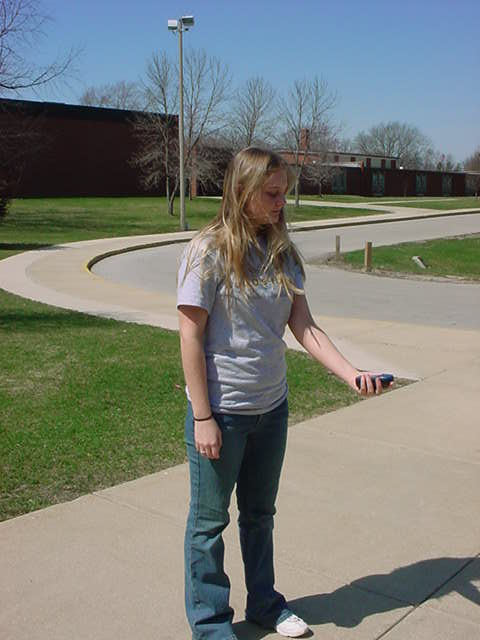
Best practice: Hold the receiver away from your body for the clearest signal.
Data Backup
- Do NOT rely solely on the device's storage
- Solution: Take a photo of the screen or write down the coordinates
- Consider logging data to a file for later analysis
Recommended Settings
| Setting | Recommended Value | Why |
|---|---|---|
| Datum | WGS 1984 | This is the native standard for GPS (World Geodetic System 1984) |
| Coordinate Format | Degrees, Minutes, Decimal Seconds | Most precise reading format |
Confirming a Good Fix
- Look for four black bars (or similar indicator) on the satellite page
- This confirms you have a solid fix
- Wait until you have at least 4 satellites before recording data
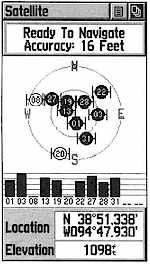
1. Satellite Status
Shows satellite signal strength and your current accuracy.

2. Map View
Visualizes your position and tracks on a background map.

3. Navigation
Uses a compass ring to guide you toward a waypoint.
Experiment 2: Distance Measurement
In this experiment, you will validate your GPS accuracy by comparing GPS-calculated distance to a known distance measured by pacing.
Procedure
- Find an open field with a clear view of the sky (soccer field, park, open courtyard)
- Take Position A measurement - Stand at one end and record your GPS coordinates:
- Latitude A: _____________
- Longitude A: _____________
- Pace out the distance - Walk in a straight line, using approximately 1-meter strides
- Count your steps - Walk at least 50 steps (50 meters), but 100 steps is best for more accurate results
- Take Position B measurement - At your endpoint, record GPS coordinates:
- Latitude B: _____________
- Longitude B: _____________
- Record your step count: _____________ steps (approximately _____ meters)
Data Recording Form
| Measurement | Position A (Start) | Position B (End) |
|---|---|---|
| Latitude | ||
| Longitude | ||
| Satellites | ||
| HDOP |
Step Count: _______ steps × 1 meter = _______ meters (paced distance)
Calculate GPS Distance
Use an online calculator to find the distance between your two GPS points:
- Go to Sounny's Lat/Long Distance Calculator (recommended) or Movable Type Calculator
- Enter Point A coordinates (Latitude, Longitude)
- Enter Point B coordinates (Latitude, Longitude)
- Read the distance in meters
GPS-Calculated Distance: _______ meters
Analysis
| Comparison | Value |
|---|---|
| Paced Distance (steps × 1m) | _______ meters |
| GPS-Calculated Distance | _______ meters |
| Difference (Error) | _______ meters |
| Percentage Error | _______ % |
Expected Results: With recreational-grade GPS (15m accuracy at each point), you might see a combined error of up to 20-30 meters. If your paced distance was 100 meters and GPS shows 85-115 meters, your device is performing within expected parameters!
Pro Tip: For better accuracy, average your stride length before the experiment. Walk 10 normal paces and measure the total distance, then divide by 10 to get your actual stride length.
Experiment 3: Calculate Earth's Circumference
In this classic experiment, you will recreate the method used by Eratosthenes over 2,000 years ago to calculate Earth's circumference - but using modern GPS technology!
Historical Context: Around 240 BCE, the Greek scholar Eratosthenes calculated Earth's circumference by measuring the angle of the sun's shadow at two locations a known distance apart. He got remarkably close to the true value! You will use the same mathematical principle, but with GPS coordinates instead of sun shadows.
The Mathematical Principle
If you travel a certain distance along Earth's surface, you also travel through a certain angle of Earth's curvature. The ratio of your distance to that angle equals the ratio of Earth's full circumference to 360 degrees:
Procedure
Using your data from Experiment 2:
- Calculate the angular difference between your two GPS points
- Use the formula to calculate Earth's circumference
- Compare to the actual value (approximately 40,075 km)
Step 1: Calculate Angular Difference
The simplest approach is to calculate the latitude difference (if you walked roughly north-south):
Angular Difference (degrees) = |Latitude B - Latitude A|
Example: If Latitude A = 48.58400 and Latitude B = 48.58490
Angular Difference = |48.58490 - 48.58400| = 0.00090 degrees
For more accurate results (if you walked at an angle), use Sounny's Lat/Long Distance Calculator or the Haversine formula calculator which accounts for both latitude and longitude changes.
Step 2: Calculate Circumference
Apply the formula:
Circumference = (Distance / Angular Difference) × 360
Example: If Distance = 100 meters and Angular Difference = 0.00090 degrees
Circumference = (100 / 0.00090) × 360 = 111,111 × 360 = 40,000,000 meters = 40,000 km
Data Recording
| Measurement | Your Value |
|---|---|
| Distance walked (from Experiment 2) | _______ meters |
| Latitude A | _______ |
| Latitude B | _______ |
| Angular Difference (|Lat B - Lat A|) | _______ degrees |
| Calculated Circumference | _______ km |
Compare to Actual Value
| Comparison | Value |
|---|---|
| Your Calculated Circumference | _______ km |
| Actual Earth Circumference (equatorial) | 40,075 km |
| Error | _______ km (_______ %) |
Discussion Questions:
- How close did your calculation come to the actual value?
- What sources of error affected your result?
- How could you improve the accuracy of this experiment?
- Why did Eratosthenes need the sun, while you could use GPS?
Note: Small measurement errors get amplified when calculating large values. If your GPS positions were off by just 10 meters, this could result in circumference errors of thousands of kilometers! This demonstrates both the power and limitations of GPS for precise measurements.
Data Collection Form
Visit 3-5 waypoints around the ISU campus and record GPS data:
| Waypoint | Description | Latitude | Longitude | Altitude (m) | Satellites | HDOP |
|---|---|---|---|---|---|---|
| 1 | ||||||
| 2 | ||||||
| 3 | ||||||
| 4 | ||||||
| 5 |
Testing Accuracy
Method 1: Compare to Known Point
- Go to a surveyed benchmark or known location
- Record your GPS coordinates
- Calculate the difference from the known coordinates
Method 2: Repeat Measurements
- Stand at one location for 5 minutes
- Record coordinates every 30 seconds
- Calculate the spread (standard deviation)
Method 3: Compare to Phone GPS
- Open Google Maps or GPS app on your phone
- Compare readings with your Arduino GPS
- Note any differences
Environmental Effects
Test GPS performance in different environments:
| Environment | Expected Effect |
|---|---|
| Open field | Best accuracy, many satellites |
| Near buildings | Possible multipath, fewer satellites |
| Under trees | Reduced signal, slower fix |
| Indoors | May not work |
| Near water | Good reflection possible |
Data Analysis Questions
After collecting field data, answer these questions:
- How many satellites did you typically see? How did this vary by location?
- What was your typical HDOP value? How did this affect accuracy?
- How close were your readings to known locations or your phone GPS?
- Did the environment affect your results? (buildings, trees, etc.)
- How long did it take to get a first fix in different locations?
Workshop Assessment
Each group should complete:
- Assembled GPS unit - Working hardware with successful satellite fix
- Field data - Completed data collection form from 3-5 waypoints
- Analysis summary - Answers to the analysis questions above
- Accuracy report - Comparison of readings to reference points
Grading Criteria
| Criterion | Points | Description |
|---|---|---|
| Hardware Assembly | 25 | Unit properly wired and functional |
| Satellite Fix | 25 | Successfully acquired GPS fix outdoors |
| Field Data Collection | 25 | Complete data from all waypoints |
| Data Analysis | 25 | Thoughtful answers to analysis questions |
| Total | 100 |
Useful Resources
- Mapping Your Data: Google My Maps
- GPS Visualization: GPS Visualizer
- u-blox NEO-6M Datasheet: u-blox.com
- TinyGPS++ Library: GitHub / TinyGPSPlus